
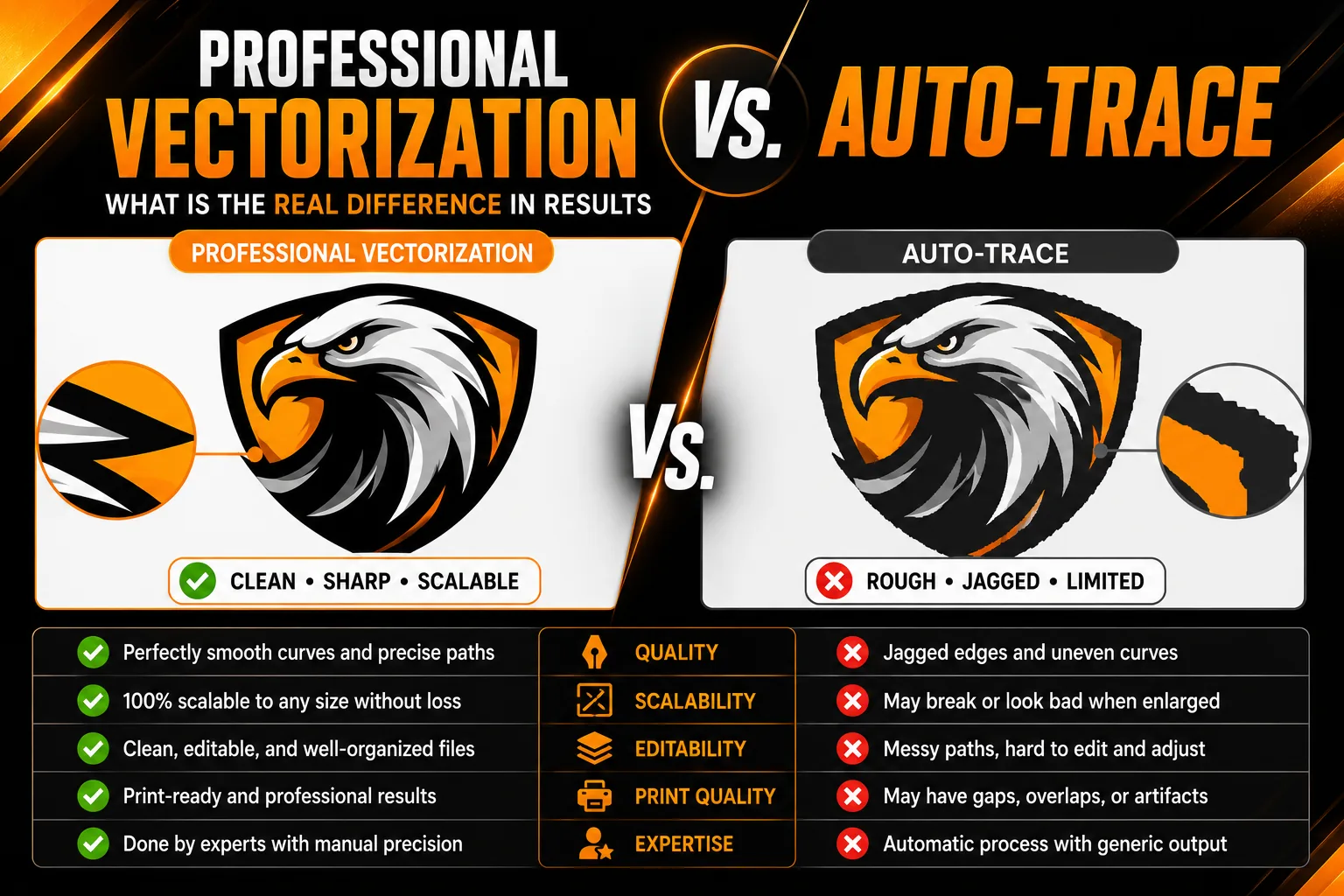
Professional Vectorization vs. Auto-Trace: What Is the Real Difference in Results
When a business needs to convert its logo from a raster file (PNG, JPEG) to a vector format, there are two fundamentally different approaches: using an automated tracing tool or commissioning professional hand vectorization. The price difference is dramatic, auto-trace tools are either free or included in design software, while professional vectorization costs $30 to $250. Understanding what drives that difference and whether it matters for your specific use case is the key to making the right decision.
How Auto-Trace Works
Auto-trace algorithms scan the pixel grid of a raster image, detect transitions between colors or tones at pixel boundaries, and draw vector paths along those detected edges. The result is a technically valid vector file, one that is technically scalable without quality loss. However, the quality of the vector paths depends entirely on the quality of the original raster image and the simplicity of the design.
Adobe Illustrator’s Image Trace is the most sophisticated widely available auto-trace tool. Even with its most refined settings, it consistently produces paths with many more anchor points than necessary, imprecise edge rendering along curves, incorrect color separation for multi-color logos, and distorted letterforms when text is present in the source image. Free online auto-trace tools produce results that are generally inferior even to Illustrator’s Image Trace.
How Professional Hand Vectorization Works
Professional hand vectorization involves a designer opening the raster logo as a reference layer in Adobe Illustrator or equivalent software and manually recreating every element of the logo as clean vector paths, using the raster image as a guide, not as source material to be traced.
Each shape is built from scratch using the pen tool and geometric drawing tools, placing anchor points at mathematically precise positions that produce perfectly smooth curves with the minimum necessary number of control points. Typography is either recreated using the original font (if available) or redrawn character by character as custom vector paths. Colors are precisely matched to the original brand color codes rather than being interpreted from pixel sampling.
The result is a file where every path is clean, every curve is mathematically precise, every color is correct, and the total anchor point count is at the absolute minimum needed to accurately represent the design. This file is not only better to look at, it is structurally superior for every future use case.
Visible Differences in Real Production Applications
The quality difference between auto-traced and hand-vectorized files is most visible in three specific production contexts. In large-format printing at full size, billboards, banners, vehicle wraps, the waviness of auto-traced curves becomes visible to the naked eye as a subtle but real irregularity in edges that should be perfectly smooth. In embroidery, where a digitizing machine converts vector paths to stitch patterns, auto-traced paths with excessive anchor points produce stitching that is irregular and difficult to stabilize. In cutting plotters used for vinyl signage and decals, auto-traced paths produce cuts that follow the irregular anchor point distribution rather than a smooth curve.
In digital applications at normal screen sizes, the difference is often not visible. This is why auto-trace can be an acceptable approach for logos used primarily in digital contexts at modest sizes, social media graphics, website use, email signatures, where the scale is small enough that path quality does not affect visible output quality.
File Structure and Future Editability
Beyond the visible quality difference, the structural quality of hand-vectorized files matters significantly for future design work. An auto-traced logo file may contain 500 to 5,000 anchor points for what should be a 30 to 50 anchor point design. When a future designer needs to modify the logo, adjusting colors, changing proportions, adding or removing elements, working with an over-anchored auto-traced file requires cleaning up the path structure before any meaningful modification is possible. This adds cost and time to every future design project that touches the logo.
A professionally hand-vectorized file with minimal, clean anchor points can be modified by any competent designer in minutes rather than hours. The investment in professional vectorization continues to pay returns every time the file is used or modified in the future.
Making the Right Decision for Your Situation
Auto-trace is appropriate in specific, limited circumstances: you have a very simple logo with solid colors and clean high-contrast edges, you need a quick solution for a low-stakes digital-only application, and you understand the limitations of the result. It is not appropriate for any logo you plan to use in professional print production, large-format output, embroidery, or any context where edge quality and path cleanliness matter.
Professional hand vectorization is the right choice for any logo that represents your business in professional contexts, will be reproduced at large scale, needs to be embroidered, or will be used as the source file for future design work. The cost is modest relative to the value of the deliverable.
Frequently Asked Questions About Vectorization Methods
What is auto-trace and how does it work?
Auto-trace is an automated process that converts a raster image to vector paths by algorithmically detecting edges and color boundaries. The software scans the pixel grid and draws vector paths along color transitions. The result is a technically usable vector file, but one that often contains hundreds of unnecessary anchor points, imprecise edges, and color interpretations that differ from the original design intent.
When is auto-trace acceptable and when is it not?
Auto-trace produces acceptable results only for very simple, high-contrast images: a solid black silhouette on white, a simple two-color shape with no fine details, or a basic geometric form. It fails for logos with multiple colors, gradients, fine details, typography, or anti-aliased edges. For any logo used professionally in print, embroidery, or signage, professional hand vectorization is the reliable choice.
How can I tell if a vector file was auto-traced or hand vectorized?
Open the vector file and examine the anchor points on any curved path using the Direct Selection tool. An auto-traced file will typically have dozens of unnecessary anchor points even on simple curves, placed inconsistently along the path. A professionally hand-vectorized file will have the minimum necessary anchor points placed at mathematically precise positions, typically four points on a perfect circle.
Does it matter if my vector file was auto-traced vs hand vectorized?
Yes, in several practical ways. Auto-traced files produce rougher edges at large scale, misshapen letterforms in typography, and are significantly harder for future designers to modify, increasing the cost of any future updates to the logo.
How long does professional hand vectorization take compared to auto-trace?
Auto-trace completes in seconds. Professional hand vectorization of a simple logo takes 1 to 2 hours. A complex logo may take 4 to 8 hours. The time difference explains the cost difference, but for any logo intended for professional production use, the quality difference justifies the additional investment.


No comment